
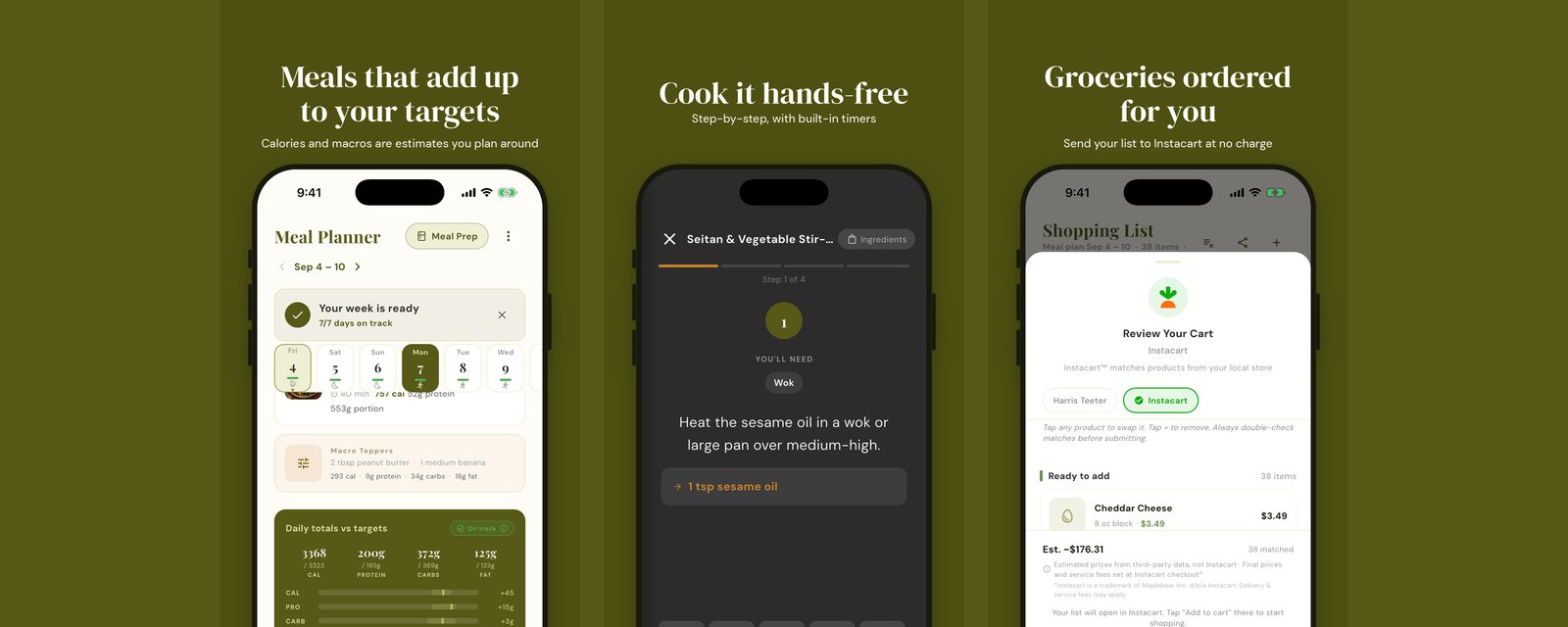
Most questions we get are not about macros. They are about the moments around them: a reel you saved and want to actually cook, a lunch you did not plan and need to log, a kid with a nut allergy, and the day that ends up 200 calories short no matter what you pick. This is how Prepwell handles each of those, including where it falls short, so you know what you are getting before you build your first week.
Turn an Instagram recipe into a meal on your plan
Open the reel in Instagram, tap Share, and pick Prepwell. The app reads the creator's full caption, pulls out the ingredients with amounts and the steps in the creator's order, and estimates the macros per serving. You get a recipe card you can scale to your household, save, and drop onto any day. Once it is on a day, its ingredients land on the grocery list like everything else, and the planner counts its calories and protein toward that day's targets.
Two honest limits. If the recipe lives only in the voiceover and the caption is a hashtag and a heart, there is nothing to read; the app will try from the thumbnail and tell you it had to guess, and you should check the list before shopping. The macros are estimates from the ingredients, not label values, and the recipe card says so. TikTok and ordinary recipe websites work the same way. Import is a Premium feature.
Log a meal from a photo
Planned meals log themselves with one tap, using the recipe's numbers. The photo logger is for everything else: the work lunch, the restaurant plate, the thing you made from the fridge. Take a picture in the meal log and Prepwell names what it sees, estimates the portion of each item, and fills in calories, protein, carbs and fat. You can correct any line before you save, and the entry carries an estimated marker so you can tell it apart from a recipe you cooked to the gram.
Treat it the way you would treat any photo calorie tool: good enough to keep the day honest, not a lab. A sauce you cannot see and a portion the camera cannot weigh are where it drifts. For packaged food, the barcode scanner is more exact and pulls the label values directly. Photo logging is Premium; barcode scanning is on every plan.
Plan around allergies, not just preferences
During setup you pick from the nine major US allergens (milk, eggs, fish, shellfish, tree nuts, peanuts, wheat, soy, sesame), add intolerances like garlic or ginger, list any foods to avoid, and set no pork or no beef if that applies. From then on, three things happen. Recipes that contain those ingredients never appear in your plan or in swap suggestions. Where a safe substitute exists, the app uses it instead of throwing the recipe out, for example garlic-infused oil in place of garlic for an intolerance. The barcode scanner has an allergen-check mode, so you can scan a packaged product in the aisle and see whether it conflicts with your list.
The limit here matters more than the feature. Prepwell is a filter over recipe data and product labels; it is not a guarantee, and it cannot see a shared fryer or a manufacturing line. Read labels, especially for anyone with a serious allergy. The app is there to make the first cut, not the last.
Core meals, extra meals, and macro toppers
This is the part that is different from a recipe box, and it is worth understanding because it is what you see on the planner every day.
The planner starts with your core meals: breakfast, lunch, dinner and a snack (you choose which slots are on). It picks recipes for each slot and scales the portion to each person at the table, so a dinner for two is the same recipe at two different sizes if your targets differ. Most of the time those four meals get you within a few percent of your calories and protein for the day.
When they do not, the planner does not stretch a dinner to 1,100 calories to make the math work. It adds an extra meal, a protein shake or a small bowl, as its own card on the day. If the gap is smaller, it adds a macro topper: a small add-on in the neighborhood of 200 calories, like Greek yogurt, a handful of nuts, or olive oil on the vegetables, chosen to fill whichever macro is short. Toppers group into one card so they do not clutter the day.
You are not stuck with any of it. Swipe an extra meal or the toppers card to the left and it is gone, with an undo. Swap it for a different option from the sheet. On a training day with a higher target you will see more of them; on a rest day, fewer or none. If you picked the casual or family mode during setup, the planner skips extras and toppers entirely and just builds good dinners at normal portions. This is also why the shopping list sometimes has a tub of yogurt you did not expect: it belongs to a topper, and if you remove the topper, it leaves the list.
How it fits together
Import the reel on Sunday, let the planner build the week around it, swipe off a topper you do not want, send the list to Instacart or your Kroger cart, and log the Tuesday lunch you bought with a photo. Every piece writes to the same day, so the numbers you see on the home screen are the plan plus what you actually ate, not two separate stories. That is the whole idea.
Frequently asked questions
Can Prepwell import a recipe from an Instagram reel?
Yes, on Premium. Share the reel to Prepwell from Instagram and it reads the full caption, pulls out the ingredients and steps, estimates the macros per serving, and saves it as a recipe you can add to any day. If the creator put the recipe only in the voiceover and not the caption, the app can only work from the caption and the thumbnail, and it tells you when it had to guess.
How does photo meal logging work, and how accurate is it?
Take a photo of your plate in the meal log and Prepwell identifies the foods and estimates portions and macros, which you can edit before saving. It is an estimate, like every photo calorie tool, and it is most useful for meals you did not cook from a recipe. Logged meals from a recipe on your plan use the recipe's numbers instead.
Does Prepwell handle food allergies?
Yes. In setup you choose from the nine major US allergens plus common intolerances, and add any foods to avoid. Recipes containing those are kept out of your plan and swaps, and where a safe substitute exists the app uses it instead of dropping the recipe. The barcode scanner can also check a packaged product against your allergy list in the store. Always read labels; the app is a filter, not a guarantee.
What are extra meals and macro toppers?
When your breakfast, lunch, dinner and snack are set but the day is still short of your targets, Prepwell adds an extra meal such as a protein shake or a small bowl, or a macro topper, a small add-on of around 200 calories like Greek yogurt or nuts, to close the gap. They appear as their own cards on the day, and you can swipe either one away or swap it. Casual mode does not add them at all.